Screw Hashbangs: Building the Ultimate Infinite Scroll
I’m just a student in a field unrelated to computer science, but I’ve been coding for years as a hobby. So, when I saw the current state of infinite scroll, I thought perhaps I could do something to improve it. I’d like to share what I came up with.
(Demo: The impatient can just try it out by scrolling+navigating away+using the back button on the front page of my site. Works in current versions of Safari, Chrome, Firefox.)
Hashbangs Lie
Anybody that has even casually coded JavaScript over the past two years can tell you the story: Google proposed using the hashbang (#!) to enable stateful, crawlable AJAX pages. This proposal caught on. But at its root, the hashbang is a messy solution to a difficult problem: JavaScript is capable of creating an entire application, but browsers are still gaining the ability to update the URLs in their address bars to represent application state. (IE’s progress in this regard is abysmal and inexcusable).
Unfortunately, hashbangs are the dirt on a clean countertop. We’ve spent years trying to clean up our URLs and make them semantic by managing mod_rewrite, readable slugs, and date formatting. Now, we take a step backward, forcing the average internet user to learn another obscure set of symbols that make URLs harder for them to parse. Hashbangs are pollution.
But the real problem is the lying. Originally, a URL pointed to a resource and the deal between user and browser was this: you asked for something, and it was delivered to you. When that URL had a fragment identifier (e.g. url/#frag_id) at the end, there was still the tacit promise that the fragment existed on the page. But when your URL ends with a hashbang, the terms of the deal between user and browser change dramatically. Indulge me in an analogy.
Hashbangs for Lunch
Let’s say you are at a restaurant. We’ll call it cafe.com. Glancing through the entrées, you decide you’d like a burger, with some ketchup on the side (a truly great burger needs no ketchup… humor me here). “Coming right up” says your server, and leaves to retrieve your order.

Case 1
cafe.com/entrees/burger/ketchup/
If the server accepted your order with a URL sans fragment identifier, then you get everything at once, your ketchup is on the side of your plate, and you can immediately begin enjoying your delicious burger.
Case 2
cafe.com/entrees/burger#ketchup
If the server accepted your order with a URL PLUS fragment identifier, they’ll bring some ketchup to the table. “Where’s my ketchup?” you ask. The waiter helpfully points to the bottle of ketchup hiding behind the napkins. Everyone still gets what they want.
Case 3
cafe.com/#!/entrees/burger/ketchup
The system breaks down with the hashbang-style order. Best case scenario, here’s what happens: your burger arrives without ketchup. “Oh, that’ll be here in a bit” the waiter says, “I’ll make a separate trip to bring it over.” Here, the hashbang was guilty of, essentially, a lie of omission.
But here’s the worst case scenario for #3: you walk into a completely empty room. The waiter awkwardly walks up to you (remember, the room’s empty, you can’t even sit down yet) and takes your order. After staring at the empty room for a while, furniture begins to show up, and the restaurant takes shape. You see the waiter come back with a Weber grill.
“What the heck is going on?”
“We’re assembling it all for you, right here!” the waiter replies. A multitude of trips bring over a cook, the raw ingredients, and the whole darn thing is constructed in front of you. Your reaction is less than favorable: “But I just wanted a burger! Whatever happened to using a kitchen?! All the other restaurants just bring it to me all at once!”
The ketchup is applied for you, with a superfluous and sloppy auto-scrolling mechanism.
I call this “lying” because you don’t exactly get what you requested. You get factories and special features and all this extra stuff.
Read on to see how I applied this lesson to infinite scroll.
What’s OK with ∞ Scroll
An infinitely scrollable page is conceited because it presumes to know what you want. “Oh, you’ve reached the bottom of the page?” it asks… “well, why don’t I show you more?” This facilitates casual browsing and is especially well-suited to image galleries.
The fat footer does not suit my purposes, so I am perfectly FINE with the page assuming you’d like more, making the end of the page some weird variation of one of Zeno’s paradoxes. If you don’t feel comfortable with this or your projects don’t require such behavior, then infinite scrolling isn’t for you. That’s fine. Thanks for reading.
But you might want to hear the real problem…
What’s NOT OK with ∞ Scroll
Paul Irish’s thorough and utilitarian infinite-scroll.com starts to get at the main problem of tacking on content to the end of your page:
There is no permalink to a given state of the page.
Well, yes. If you only implement infinite scroll halfway. What I wish Mr. Irish would’ve said: FOR GOD’S SAKE, DON’T BREAK THE BACK BUTTON.
Solution
I’ve written an improved infinite scroll (which you can try out on the front page of my site) that does the following:
- Preserves the back button.
- Does NOT use the hashbang, no matter how happy twitter engineers are with it.
- Gives up on infinitely scrolling if (1) is impossible.
- Progressively enhances: when (3) occurs, the user follows a good ol’ hyperlink for more content.
Remember, “If your web application fails in browsers with scripting disabled, Jakob Nielsen’s dog will come to your house and shit on your carpet.”).
I will outline my thought process here, but remember I’m just doing this for a hobby, so should you want to use this, you’ll probably want to recode it yourself. Let’s get started!
URL Design
I had to have a way to represent my page browsing states in a way that was easy to parse with regular expressions yet meaningful to the user. My schema:
load second page:
/page/2/
load 2 pages of results, including page 2, from beginning:
/pages/2/
the same as previous, except page 1 is explicit:
/pages/1-2/
load 2 pages of results, including page 3, excluding page 1:
/pages/2-3/
Here’s a helpful illustration:
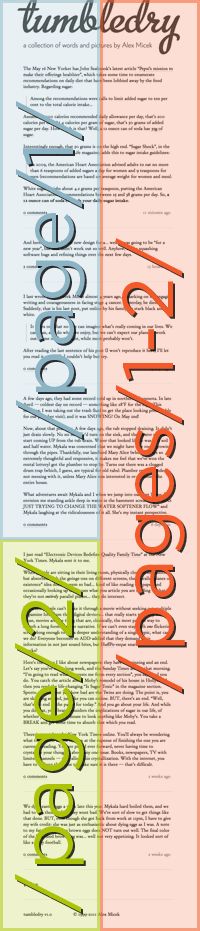
I’ll annotate that image as we put this together.
Debouncing
I’m sure you’ve noticed that scroll-activated & mouseover JavaScript aren’t always robust. Quickly scroll to the bottom, then back to the top or mouseover-mouseout very fast, and suddenly JS fails to recognize your true intent. Things get stuck on or off… it’s a disaster.
In these situations, you should always debounce:
Debouncing ensures that exactly one signal is sent for an event that may be happening several times — or even several hundreds of times over an extended period. As long as the events are occurring fast enough to happen at least once in every detection period, the signal will not be sent!
I use the jQuery doTimeout plugin. Now that we can reliably detect scrolling to the bottom of the page, we begin the fun stuff.
Adding a Page
jQuery makes it simple (fun?) to extract the URL for the next page from a link I’ve placed at the bottom of the current page. Using the example image from above, let’s say we’re on page/1/. We scroll to the bottom, our debounced script detects this, and AJAX fires to load page/2. The page/2 URL is contained within the “↓ More” link at the bottom of the page. The AJAX result is appended to the page and the “More” link hidden.
Done!
Not if you want your user to enjoy using your page. Two problems:
- Your user is marooned on a giant, growing page. They see something cool and copy the current URL. Their friend clicks the URL and has NO IDEA what is going on.
- Your user clicks a link that interests them. “Cool!” they say, “I’ll just click the back button and keep browsing where I left off!”
*Clicks back button*.
And now they’re stuck at the very first page, having no idea how to get to where they were.
Both cases result in confusion — you’ve abandoned your user in the name of a cool way to add new content! No no no no. Repeat after me: “I must update the address bar to reflect the new state of the page.”
Updating the Address Bar
This is where you and I may differ — I will ONLY use history.pushState/replaceState to update the address bar. I don’t care how many libraries have been written to ease the process of falling back to hashbang-preservation of application state. I refuse to use hashbangs (Cf. the intro to this post!), and I wrote my infinite scroll script to take absolutely no action if history.pushState is not supported. (A nice detection of history support, borrowed from the excellent Modernizr: return !!(window.history && history.pushState);).
Now, I have the luxury of using JavaScript simply as a progressive enhancement; thus, I prefer to revoke functionality instead of spending days of my life working around old browsers. Again, I understand you may not have this luxury, and must use hashbangs for your project. Godspeed.
For those of you still left, put on your regex pants, here we go. I wrote a potent little regular expression to parse URLs of the schema described above. Here’s the unescaped version:
/pages?/([0-9]+)-?[0-9]*/?$
This regular expression is run against up to two strings:
- BROWSER URL (
window.location.href), two variations:
/page/xx/
or this:
/pages/xx-yy/ - The “↓ More” link at the bottom of the page:
/category/page/zz/
Using TWO possible sources for page information makes the script robust, always able to determine how to update the URL. It works like this:
- Load tumbledry.org/
- Scroll. Detect the “↓ More” link and concatenate its contents to the current page. Parse the “↓ More” link using the regex above, and update the URL to
tumbledry.org/pages/1-2/ - Scroll. Detect the “↓ More” link and concatenate its contents to the current page. Parse the current address bar link using the regex above, and update the URL to
tumbledry.org/pages/1-3/ - Repeat (3).
Now that we are updating the URL to represent the state in an honest way, the user gets to navigate without jarring changes to their page location. I’ll explain below.
Handling the Back Button for Inter-Page Navigation
The user can freely click links and hit back to the infinitely scrolling page without worrying about losing their place:
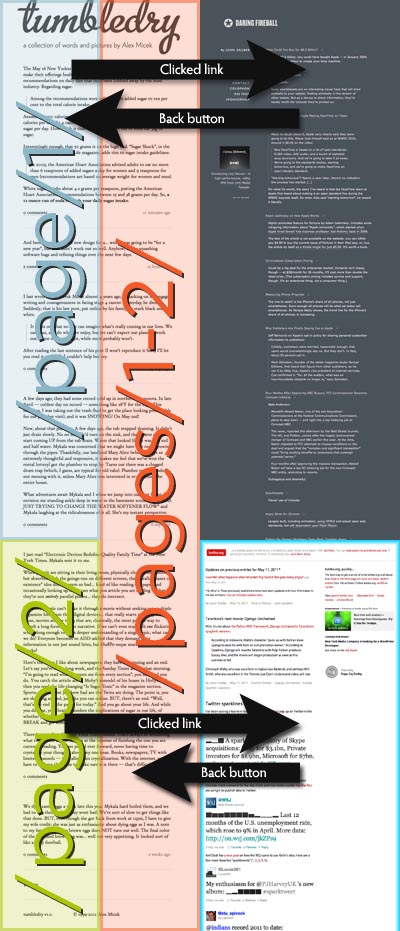
The first set of arrows should be self-explanatory — just your usual browsing. The second set of arrows illustrates how an intelligent infinite scroll can update the address bar URL. When the green area is tacked on to the blue, the script updates the URL to the red area: (/pages/1-2/); this reflects the state of the page. Now, when the user hits the back button, they end up exactly where they were on the page. Why? Because the URL they are navigating back to (illustrated in red) loads all the content the they were viewing (illustrated in blue and green).
Handling the Back Button for Intra-Page Navigation
Note: I originally thought that this behavior would be helpful rather than hurtful. Judging from the comments, I’ve learned otherwise. Since then, I’ve disabled this type of back button handling, and reinstated traditional back button behavior.
There’s one other exciting application of this address bar URL-updating we’ve been doing. Using window.onpopstate to detect a back-button press, the infinitely scrollable page can move backwards through the history stack, and remove nodes of content accordingly.
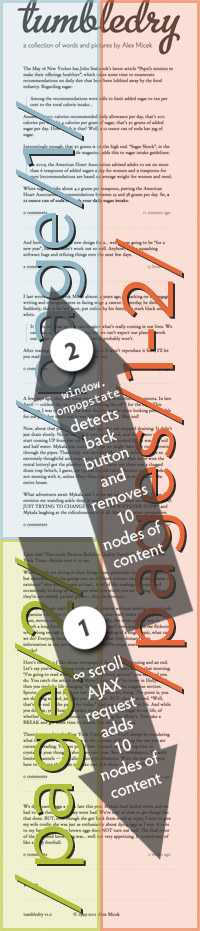
An interesting wrinkle: I’m using about a 200ms delay between the user hitting the bottom of the page and the AJAX firing to retrieve the next page. So, when the user hits back and the nodes are removed, they end up at the bottom of the last page, leaving them about 200ms to scroll up out of the target zone. So, using the window.onpopstate function, I temporarily modify the delay to 3000ms, giving the user time to scroll up and out of the target zone.
By adding and refining this popstate detection, the user gets a pretty darn good experience:
- linkable pages without an overwhelming number of items
- predictable forward and backward button behavior
- no need to keep clicking “next” or “more”
Known Issues
- Because
/page/1/has some of the same information as/pages/1-2/, my content management system ends up caching some duplicate information. This could be mitigated on the back-end by having the system intelligently assemble/pages/1-2/from already cached items, but given the small scope of my site, it’s not necessary. - If I navigate away from
/pages/1-2/and then come back, my saved value of the number of nodes previously added is lost. So, whenwindow.onpopstatefires, my code must make an educated guess about the number of nodes removed. This could be fixed by using local storage to save an array of nodes added and removed. - The entire purpose of updating the URL to
/pages/1-2/is to put the user precisely at their previous position on the page. This system breaks down if the user pops open some inline comment threads, navigates away, and then returns. I did not see a semantic way of saving this comment thread open/close information in the URL, so I didn’t bother creating a system to save this particular state. Again, some local storage could be used to save which comment threads were open, and pop them open again when the user returns to the page.
Enhancements
By caching the nodes added and removed, intra-page back button use followed by scrolling could be done without any extraneous HTTP requests.
Conclusions
I stubbornly insist that my JavaScript will only give you infinite scroll if your browser supports the event handlers and objects required to give the best experience.
That way, I am able to ensure that infinite scroll is all gain and no loss.
If for some reason you really want to read my source, you can do so:
Comments welcome.